With our guided onboarding, you’ll get the best possible start with AM System and set the foundation for a complete quality management system. Digital processes and more efficient ways of working ensure a seamless transition and faster results.
Onboarding
A structured introduction to the platform
Our onboarding follows a well-developed methodology that combines alignment, hands-on assignments, and training sessions. It runs for 6–12 months, depending on your company size and internal project team. All sessions are conducted digitally and scheduled in collaboration with you.
Elements included
Alignment – Establish a shared understanding and commitment.
Laying the foundation – Build the core structure of your quality management system.
Process mapping & document management – Define and structure your workflows.
Digitizing with case management – Automate and streamline issue handling.
A complete platform for your QMS – Integrate all elements into a unified system.
Onboarding
Onboarding with AM System
Our Customer Success team has extensive experience in the manufacturing industry and in implementing AM System as a QMS platform. With their guidance, you’ll achieve a well-structured start and a shorter path to meeting your requirements and goals.
1.5h
Objective
The purpose of this interview is to enable AM Systems’ Customer Success Managers to gain a comprehensive understanding of your business and organisation, thus setting a solid foundation for the onboarding process.
Contents
A Customer Success Manager from AM System will interview your System Owner.
During this interview, you’ll have the opportunity to detail your business operations, organisational structure, and outline your expectations for the onboarding process, guided by a standardised questionna
Homework
Address and clarify any uncertainties identified after the interview.
Schedule and prepare the next session with the Management Group.
1h
Objective
The purpose of this interview is to enable AM Systems’ Customer Success Managers to gain a comprehensive understanding of your business and organisation, thus setting a solid foundation for the onboarding process.
Contents
A Customer Success Manager from AM System will interview your System Owner. During this interview, you’ll have the opportunity to detail your business operations, organisational structure, and outline your expectations for the onboarding process, guided by a standardised questionnaire.
Homework
Address and clarify any uncertainties identified after the interview.
Schedule and prepare the next session with the Management Group
1h
Objective
The aim is to equip the project group with a robust understanding of AM System’s management capabilities and to foster a shared understanding of the project’s framework and goals.
Contents
We will review the Foundation stage (1.1, 1.2) to clarify the company’s goals, boundaries, and commitment from the management team to the project group.
To embed support in the project team, it may be necessary to demonstrate the AM System as a platform for management systems.
Review of the onboarding process
Review of the project group’s various roles.
Homework
Work on collating or creating organisational charts (across companies and departments).
Create a summary of the company’s various functions and roles.
Before progressing to the next stage, you should be able to accurately describe the current document/folder structure.
2h
Purpose
Create a common understanding of the organization of the business, in order to create the right conditions. This in the form of users' different rights in the system (Profiles) and basic document control.
Contents
Review of the outlined organization and description of the company's various roles/functions
Insight into the Document module's category management and the impact of the profile setting
Guidance in the creation of departments
Guidance in the creation of profiles + log
If necessary, guidance in the creation of workspace
Add at least two users
Microsofts EntraID
Homework
Finalizing departments
Decide and create desired profiles
If necessary, create the desired workspace
Add at least two users for each profile
2h
Objective
To develop a comprehensive understanding of AM Systems’ document management by category and basic settings within the Document module, and understand how to organise the site’s structure and settings effectively.
Contents
Reviewing the homework and clarify potential issues going forward.
Guidance in category settings.
Guidance in the Document module’s basic settings.
Outlining the navigation tree.
Homework
Continue configuring the basic settings.
Begin creating the category tree and set the parameters for one or more categories.
Choose a relevant process as the starting point for the ongoing Onboarding.
2h
Objective
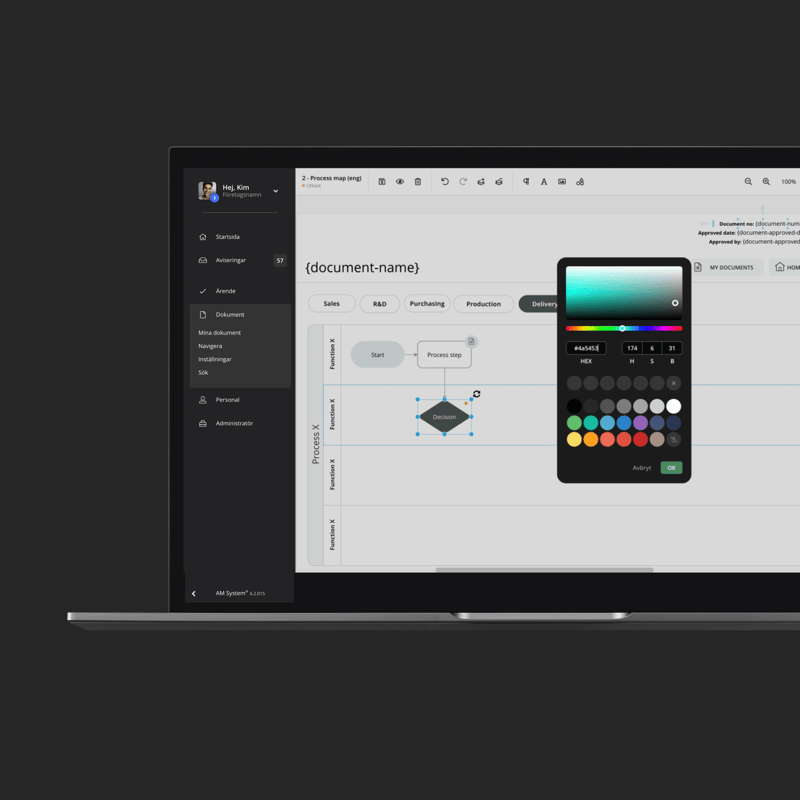
The aim is to understand the functionality of Layout documents, which are essential for creating a visual management system, and to practice sketching out a process and presenting the results.
Contents
Review the homework and clarify potential issues going forward.
Inspiration and creative discussion on how to visualise the management system with processes and customized navigation.
Guidance in the basics and functionality of Layout documents.
Create an initial process mapping template.
Homework
Establish the desired process mapping template.
Apply the template to a selected process.
Identify the controlling documentation needed for the chosen process. What already exists, what’s no longer relevant, and what’s missing?
We encourage a creative and imaginative approach with the Layout document tool.
2h
Objective
Understand the fundamentals of creating, collating and collaborating on documentation.
Contents
Review the homework and clarify potential issues going forward.
The essentials of creating documentation, sharing, collaborating, reviewing and publishing.
Word import
Understand how to create and publish templates.
Discuss the role of public documents.
Link from layout document.
Overview of “My Documents”.
Homework
Establish an ongoing process of creating and sharing documentation for both established and new processes.
Publish and review documentation to ensure it works based on the category settings.
Link relevant documents to the process flow created in 3.2.
2h
Purpose
Ensure a thorough understanding of the Document Module’s functionality and potential.
Contents
Follow-up and Summary
Review the category tree
The category settings (are they working correctly?)
Overview of the document module and its basic settings
Bundles
Layout document functionality
Text document overview
Reflection on Lessons learned
Added functionality
Public sharing and governance
Perma links
Create, save and share search queries
“My documents” – overview & status
Read API
Homework
Reflect on discussions and implement recommendations. Or add functionality that’s been under consideration.
2h
Objective
Finalize and summarize document management & process mapping. Develop a basic understanding of Case management.
Contents
Reviewing the homework and clarifying potential issues going forward
Demonstrate and emphasise the potential and functionality of the Case module, focusing on the chosen process
Discuss the initial starting point for the Case module. Reflect on the usefulness, complexity, and required effort
Homework
Decide on which workflow to prioritise
Identify the structure and functionality of the flow, as well as the relevant process in the document management (process mapping)
2h
Objectvie
Review of the selected workflow and understanding the basic settings of the case management.
Contents
Reviewing the homework and clarifying potential issues going forward
Review of profile settings for case management
Introduction to the basic settings of the case management
Start creating the first case form
Homework
Identify and create global lists and units
Complete the registration section (Section 1) of the form
2h
Objective
Continue the work on creating the prioritised workflow.
Contents
Reviewing the homework and clarifying potential issues going forward
Continue creating the form
Guidance in the key fields and functions
Guidance on how to upload data via the “external data” option
Homework
Build upon the prioritised flow
Set up activated profiles, users, and any groups in the form
2h
Objective
Achieve a deeper understanding and configuration setup.
Contents
Review the homework and clarify potential issues going forward
Setup the form, its various sections and statuses
Begin to configure more advanced settings in the form
Homework
Finish the form
Identify which parts to activate under “My cases”, based on benefit and impact on the organisation
2h
Objective
Deeper understanding of implementing systems & automation.
Contents
Review the homework and clarify potential issues going forward
Guidance and completion of the form’s advanced settings configuration
Form log
Homework
Finish and adjust
My cases
List presentation
Desired addons
Validate via a working group with all profiles connected to the form. Check that the status, “My cases” and activated addons are working as intended.
2h
Objective
To search and compile statistics effectively. Provide links to layout documents for an intuitive user experience.
Contents
Review the homework and clarify potential issues going forward
Create, save and share smart search queries through the Query builder
Data export guidance
Read API
Categorise forms
Introduce the web shop for Case
Create links to Layout documents
Reflect on Lessons learned
Homework
Finish linking the form to the layout document/process
Create search queries for data from the process
Create the required categories
Start from a relevant role. What shortcuts to information would that role need, and where in the process map or through which navigation path would they want to access case-related data?
2h
Objective
Deepen understanding of custom navigation, as well as the possibilities and constraints when printing cases.
Contents
Review the homework and clarify potential issues going forward
Guidance on how to print cases, standard and advanced
Set a realistic timeframe for coordinating further work (within 3-6 months)
Homework
Finalise the dashboard
Assess the need for form printouts and create them if required
Complete the AM Systems Onboarding evaluation
Record any issues or questions before the next review and share these with your Customer Success Manager at AM System
1-2h
Objective
Ensure that your work is going according to plan and clarify any issues.
Contents
Review of your plan & queries
Assessment of the established processes to date
Recommendations for areas requiring additional attention
Choose a date to review the implementation of the project (within 3-6 months)
Homework
Implement any recommendations going forward.
1h
Objective
Evaluate whether the new management system is proceeding as planned and effectively meeting your requirements. Ensure that the goals are being achieved.
Contents
Discussion around:
Strategic aims and successes
Engagement and development
Usage
Business benefits
Recommendations for further development
Project evaluation
Homework
Implement further recommendations in your work.
Onboarding
Achieve Maximum Impact with Our Customer Success Managers
At AM System in Borås, Victoria and Kristoffer bring extensive experience as both customers and administrators of the AM System platform. They have also held leading quality management positions within the manufacturing industry.
They are passionate about ensuring you get real value from your management system in the most efficient way possible—always focusing on maximizing value and minimizing hassle.
Whether you’ve just started using AM System’s solutions or want to deepen your knowledge, we offer both ready-made and customizable training programs tailored to meet your specific needs.
How do we get started with our management system? How long does it take to implement? We understand that you may have many questions. That’s why we have compiled common questions and answers about onboarding to make the startup process as smooth as possible.
How do we get started with our management system?
Once you have chosen AM System, we offer an onboarding process tailored to help you get started in the best possible way. We assist you in configuring the system, creating relevant documents and case workflows, and training key users so you can quickly begin using the system in your organization.
For whom is onboarding suitable?
Onboarding is designed for those in the manufacturing industry who seek guidance and support in transforming their management system into a practical tool for everyone in the organization.
What do we need to do before getting started?
It is crucial that your company has a shared understanding of the needs, expectations, and goals for your management system. You should also allocate time for the project and appoint a project team.
How long does onboarding take?
Onboarding typically takes between 6–12 months, depending on the size and complexity of your organization. You, as the customer, set the pace based on how much time can be prioritized for the work and your willingness to progress. This means it can be completed in less than six months, but it can also take longer than 12 months—it’s entirely up to you!
Who manages the onboarding project?
Onboarding is a process where AM System acts as your moderator throughout the different steps, while you internally manage the activities that take place between sessions.
How do we tailor AM System to our business?
You can easily create and customize documents, processes, and case workflows to fit your specific needs. Our flexible solutions allow you to build a system that supports your unique processes and workflows. This is, of course, covered during onboarding.
What if we need help after onboarding?
Our support team is available to answer your questions and assist you further. For ongoing support, you can book consultations as needed. Additionally, you can visit our Knowledge Hub, where you’ll find content to deepen your understanding of the system’s capabilities.
Get a demo
Ready to make work easier - and more enjoyable?
Want to see for yourself how AM System can make a difference for you? Book a demo and discover how easy it is to create structure, efficiency, and seamless workflows in your daily operations.
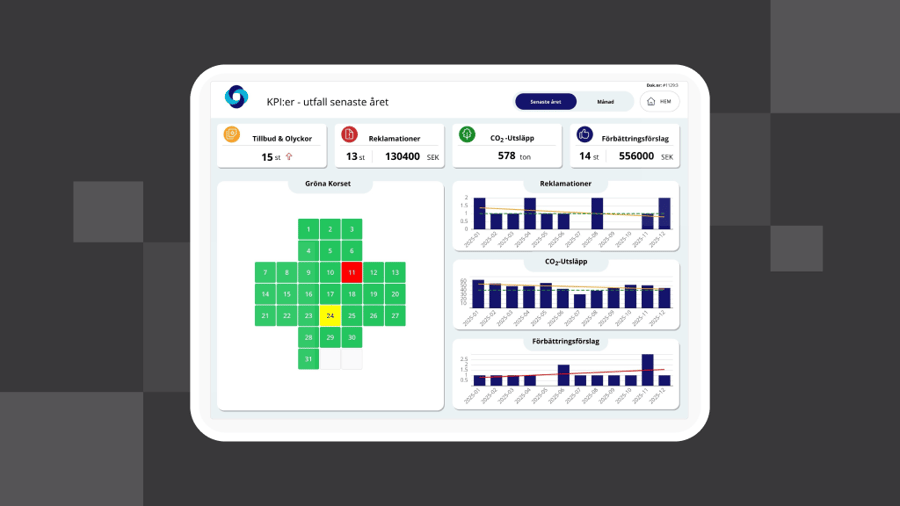
Dashboards make it easier to follow up on key figures, see status and detect deviations in time. The information is presented visually in charts that provide a quick overview and good support for decisions, without the need to search in reports or export data to external tools. Everything can now be gathered in one place in AM System Classic.
A well-functioning quality management system is essential for creating structure, ensuring quality, and driving continuous improvement within an organization. AM System offers a comprehensive platform that simplifies the creation, implementation, and use of a QMS in a way that is accessible and engaging for everyone in the organization.